Is This Email a Scam? How to Check When It Looks Completely Real
It Passed the Checkmark Test, So Why Was It Still a Scam?
Just recently, the email shown below landed in one of our Yahoo Mail inboxes. It came from Facebook’s real domain. It even had the little Yahoo verification mark next to it, the kind that’s supposed to tell you a message is legitimate. And it was still a scam.
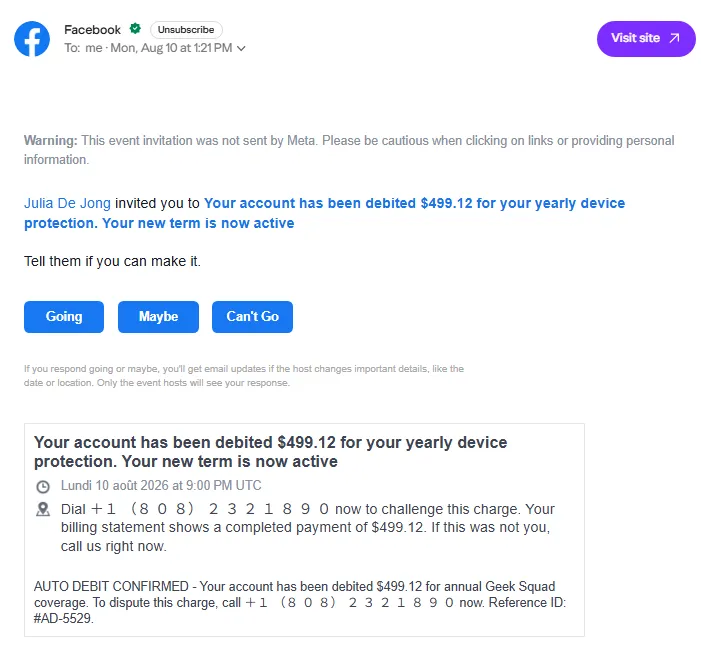
This isn’t a case of Yahoo’s system failing, or Facebook’s security being broken. The checkmark did exactly what it was built to do: it confirmed the email really did come from Facebook’s servers. What it couldn’t do was confirm that the message inside was safe. Those are two different jobs, and mixing them up is exactly what makes phishing work today.
So instead of asking “does this look real?”, the better question is: does this request make sense, and can I check it myself?
Why “Does It Look Real?” Is No Longer Enough
For years, the advice for spotting a scam was simple. Look for typos. Look for bad grammar. Look for a sender address that’s slightly off. Watch out for urgent language pushing you to act fast.
That advice still helps, but it isn’t enough anymore, because it assumes scammers are sloppy. These days, they often aren’t.
A 2024 study by researchers at Harvard tested this directly. They sent four kinds of phishing emails to real people: generic phishing, emails written by human scam experts, emails written entirely by AI, and AI emails that a person had lightly edited. The generic phishing emails got clicked 12% of the time. The human-expert emails got clicked 54% of the time. The AI-written emails, with no human touch at all, also got clicked 54% of the time, and adding a human editor moved that to 56%. AI has caught up to skilled human scammers.
Other cybersecurity groups are seeing the same shift. Phishing emails are showing up cleaner and more personal than they used to. They match the format and design of real emails, and they even include footer links that point to the genuine domain they are spoofing.
The old “something feels off” instinct doesn’t work the way it used to, because AI has smoothed out the rough edges scammers used to leave behind.
What a Verified Checkmark Actually Verifies
This is where the Facebook example matters. To understand why a “verified” email can still be a scam, it helps to know what verification actually checks.
Email providers like Yahoo and Gmail use email security protocols such as DMARC, along with a system called BIMI, to confirm that a sending server really belongs to the company it claims to, and then show that brand’s logo, and sometimes a checkmark, next to its emails. To get that badge, a company has to prove a few things: that it owns the domain it is sending from, and that its emails pass a set of authentication checks behind the scenes. Some providers, like Gmail, also require the company to prove it legally owns its logo as a trademark. Yahoo is a bit more relaxed and will show a logo without that extra proof.
All of that checks one thing: who controls the sending domain. It says nothing about what’s inside the message. A scammer can’t easily fake Facebook’s domain, so instead they get Facebook’s own systems to send the email for them, using ordinary features available to any Facebook user, and they choose what that message says. The checkmark stays accurate. The content underneath does not.
This is exactly why sensitive information should not travel through regular email in the first place, no matter how convincing the sender’s badge looks. More on what to do about that below.
The Better Question: Evaluating the Request, Not Just the Message
Once you accept that a message can look completely legitimate and still be fake, the checklist changes. The real question becomes: does this request make sense, and how can I check it on my own?
The safest way to check is to go around the message entirely. Don’t call the number in the email. Don’t click the link to “verify your account.” Instead, go to the website you already know, or call the number you already have saved, and ask directly. The Facebook email above never says which card or bank account was charged, which is a clear sign that the request does not make sense, so there is no need to call anyone. If you are still concerned, log in to your bank’s website and check the recent transactions yourself.
Never ever verify using the contact information given in the suspect email.
A simpler version of this test, used by the FTC: do I actually have an account with this company, or know this person? If the answer is no, or you’re not sure, that’s your answer. The older red flags, like pressure to act fast, still matter but as additional hints.
Even the Government Says: “Don’t Click” Isn’t Enough
Even government agencies have started saying the same thing plainly. A joint guide from CISA, the NSA, the FBI, and MS-ISAC makes the point that telling people simply to “not click” isn’t enough advice on its own, because people need to click on links in certain legit emails. A single habit, or a single trust signal, cannot become the whole defense.
This is the same logic behind keeping sensitive information out of email entirely. The email itself doesn’t need to be trusted, checked, or clicked. It’s just a notification. The actual document lives on a platform the recipient can log into directly, without depending on whether that day’s email happened to look convincing.
Practical Steps to Take Today
All of this points to the same conclusion: sensitive information needs to travel through something other than regular email. That is why so many accounting, financial, and healthcare firms use Encyro. They tell their clients up front that sensitive messages and files, like tax records, will only ever arrive through their Encyro account, never through email. If a client gets an email, however real it looks, saying tax documents are attached or linked, the rule is simple: ignore it.
It gets even simpler once a client sets up their Encyro password for the first time. After that, they don’t need to click any link in an email at all. The email just lets them know something new is waiting. They can go straight to their account and log in directly to check. If the email turns out to be fake, nothing is lost: they checked their account and found nothing new. A phishing email sent in your business’s name is dead on arrival.
Conclusion
Go back to that Facebook email one more time. The lesson is not “don’t trust checkmarks.” It’s understanding what a checkmark actually checks, which is sender identity, and what it does not, which is whether the request itself makes sense.
A verified checkmark is the minimum bar, but not sufficient by itself. It tells you the domain is real, nothing more. Before acting on any request involving money, documents, or personal information, check it independently, through a channel you already trust. And if something looks like phishing, report it to the Anti-Phishing Working Group at reportphishing@apwg.org, or to the FTC at ReportFraud.ftc.gov, even if it looked completely convincing.
The next time something lands in your inbox looking perfectly legitimate, don’t just ask whether it looks real. Ask whether you can verify the request itself, on your own.
Businesses handling sensitive documents are increasingly keeping messages and files off email, sending them instead through cloud-based secure file sharing services like Encyro. Consider your options today and adopt one to reduce your own risk. However convincing an email looks, and however official its checkmark, it should not be where the sensitive material lives.